

How it works
Follow requests, relay connections, and presence through the system.
This page explains how public HTTP and WebSocket traffic reaches your local app, including cross-instance Queue forwarding and tunnel presence.
Turbotunnel has two runtime components:
- A gateway deployed to your Vercel account.
- A local
tt httportt devprocess connected to your app.
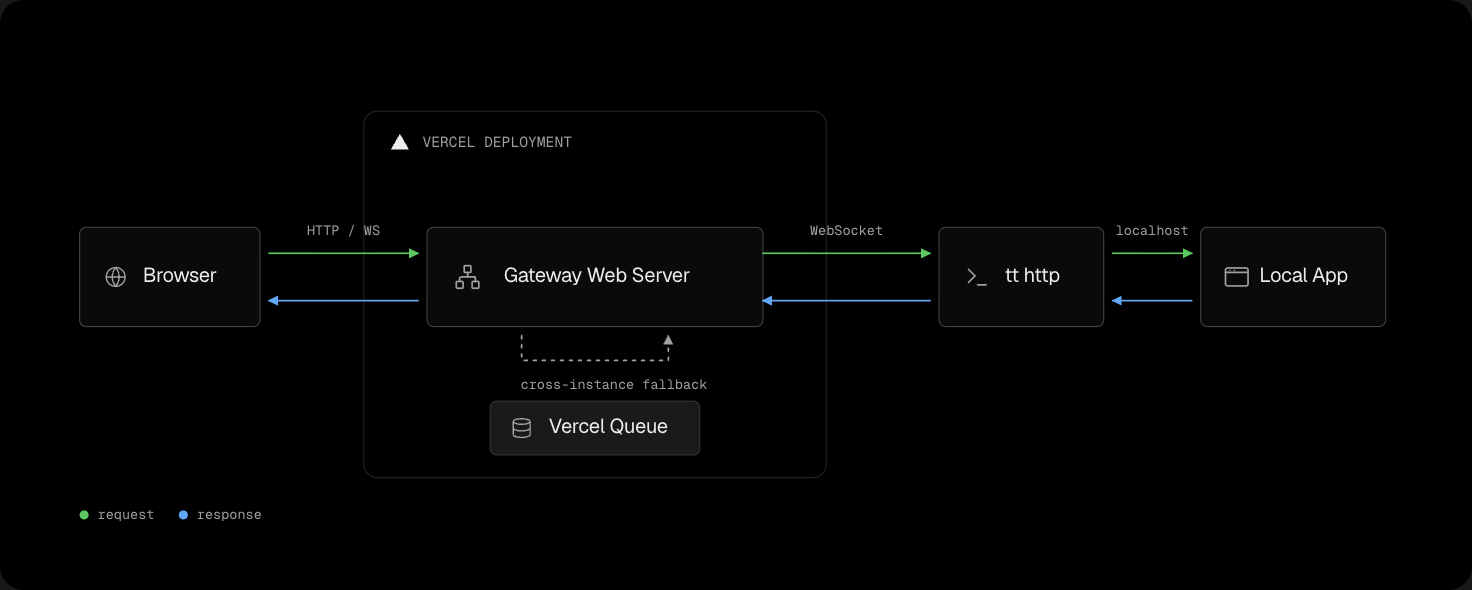
The diagram shows the direct request path and the Queue fallback used between gateway instances.
For a direct HTTP request:
- The browser sends the request to the gateway in your Vercel account.
- The gateway selects a relay WebSocket with available capacity.
- The local process sends the request to your HTTP server and returns the response.
WebSocket upgrades use a dedicated public connection through the same tunnel. The gateway and local process propagate messages and closure in both directions.
Multiple gateway instances
Vercel can run more than one gateway instance. If an instance has no eligible relay connection, it publishes the request to Vercel Queue. An instance connected to your local process consumes the request and returns the response through Queue. You select the Queue region during tt deploy.
Gateway status
Use the status endpoint to verify gateway configuration and inspect counters for the current instance:
/_turbotunnel/statusThe gateway returns plain text by default. Send Accept: application/json to receive its version, base domain, message broker, Queue region, uptime, and live counters. For base domains without a {slug} token, the bare root hostname also serves status. Use /_turbotunnel/status in scripts and deployment checks.
tt deploy requests JSON and verifies the version, base domain, and Queue region before replacing your local configuration.
Tunnel presence
Each relay connection publishes connection changes and heartbeat events to Vercel Queue. A heartbeat renews the relay’s presence lease. tt list calls the authenticated /_turbotunnel/tunnels endpoint, which rebuilds a versioned list from valid recent events.
The response reports "consistency": "bounded": event delivery can delay additions, and a relay can remain visible for up to 30 seconds after an unclean disconnect. Use tt status when you need exact process state on the current machine.
Each local process registers a private control socket under ~/.turbotunnel. tt status authenticates with a per-process token and reads the current relay state and counters. It removes records for missing sockets or invalid protocols. Temporary connection failures preserve the record and cause the command to fail.
Disconnects and retries
Relay slots reconnect independently and increase the delay between repeated attempts. The tunnel returns to ready only after every configured relay reconnects.
Ownership and availability
The gateway project, domain, environment variables, and usage belong to your Vercel account. The public URL accepts unauthenticated browser traffic while tt http or tt dev is connected. The relay secret authenticates local relay connections and tt list, not public requests.